
Every kind of video, generated and finished in one place
21 purpose-built AI studios and an autopilot editor that turns raw footage into a finished, professional edit. Write a script, upload a product photo, or drop in your raw takes — and get a finished, exportable video without leaving the browser.
No credit card required · Free plan never expires
- Renders run on server GPUs — close the tab, they keep going
- Local editing never costs a credit
- Dub into 75+ languages in the original voice
Made in VisionKut
Everything below came out of the product
Each shot was rendered by the studio named on it. Nothing here is a mock-up or a stock clip.
- AI Film
A character close-up, generated from a line of the script. See the studio
- AI Film
An establishing shot from the same script and the same cast. See the studio
- Motion Animation
Archival photo cards — eased, staggered and motion-blurred. See the studio
- purpose-built studios
- 21purpose-built studios
- dubbing languages
- 75+dubbing languages
- maximum export
- 4Kmaximum export
- credits for local edits
- 0credits for local edits
Character consistency
The same person in every shot
Ask an image model for your protagonist twice and you get two strangers — which is why most AI video falls apart the moment it has to tell a story. AI Film casts your script, generates one reference per character, then renders every shot that names them against it.
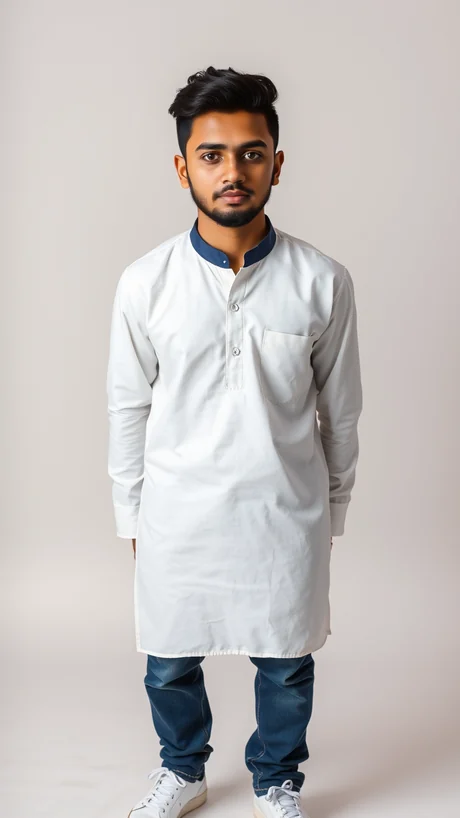
Amir — protagonist. Generated once, from the story.

Phone glare, midnight

Window light, morning

Open sun, afternoon
The studios
One studio per job, not one tool for everything
A general-purpose generator is mediocre at all of these. Each studio is built around a single workflow, with the controls that workflow actually needs — grouped here by what you already have when you arrive.
Start with an idea
A script, a topic, a premise or a product link — nothing filmed yet.
AI Film
Turn a written script into a multi-scene cinematic film with consistent characters and camera language.
from 250 credits / shot
Generate Video
A topic in, a finished narrated video out — script, voiceover, footage, music and captions.
from 50 credits / minute
Drama Studio
A premise into an episode — scenes, a fixed cast, and lines they actually speak.
from 250 credits / shot
Ad Studio
Turn a product photo into a paid-social commercial with hook, benefit beats and a closing call to action.
from 250 credits / shot
Storyboard
Turn a concept into a shot-by-shot board with framing, camera notes and a reusable style bible.
from 30 credits / frame
Start with footage you already have
You shot it or you own it. These cut, reframe and finish it.
Clip Studio
Turn one long video or a pasted link into a batch of captioned vertical clips.
free — no credits used
AI Director
Hand over raw footage and get back a finished edit, with the plan behind it shown cut by cut.
from 100 credits / render
Sports Lab
Cut a full match into a highlights reel, with the scoreboard and the commentary as the clock.
free — no credits used
Bulk Reframe
Reframe a whole library to a new aspect ratio in one batch, with the speaker kept in frame.
free — no credits used
Upscale & Enhance
Upscale to 4K, interpolate the frame rate, and deliver ProRes, H.265 or EXR.
free — no credits used
The person speaking
Whose voice it is, whose face it is, and what language it lands in.
Voice Clone
Clone a voice from a short sample, then narrate any script in it — saved once, reusable everywhere.
free — no credits used
Dubbing
Translate and re-voice a finished video into 75+ languages while keeping the original speaker's voice.
from 50 credits / minute
AI Avatar Twins
Build a speaking avatar from one photo and a voice sample, then publish without filming again.
from 200 credits / render
Eye Contact
Fix off-camera gaze so a talking head looks straight down the lens, script still on screen.
from 30 credits / minute
Designed, not filmed
No camera anywhere in these — every frame is drawn or composited.
Motion Animation
Restyle footage as a designed motion-graphics reel — collage, archival film or travel journal.
free — no credits used
Doodle Explainer
Turn an idea into a hand-drawn whiteboard explainer, script and narration included.
free — no credits used
Paper Studio
Tactile paper transitions — cutout, foldout, crumple, match cut and magazine titles.
free — no credits used
Lyric Reel
Turn a song and one photo into a reel whose lyrics land word by word, exactly as they are sung.
free — no credits used
Build once, reuse everywhere
Assets and a voice the other studios pick up rather than re-invent.
Character Library
Save a character once — turnaround, expressions and a reference sheet every studio can reuse.
from 30 credits / row
Image Studio
Turn a prompt or a photo into a finished still — HD through 8K, licensed for commercial use.
from 30 credits / image
Social Studio
Your voice, measured — then hooks and posts written in it, tuned by what actually performed.
free — no credits used
Autopilot Editor
Raw footage in, a finished edit out: one click plans and applies the whole edit, and every step stays yours to change.
How it works
Idea in, finished video out
Four steps, and the slow one does not need you sitting there watching it.
- 1
Bring an idea or an asset
Paste a script, upload footage, drop in a product photo or import from a link. Every studio starts from something you already have.
- 2
Pick the studio
21 purpose-built studios, each tuned to one job — clips, film, ads, storyboards, explainers, dubbing, avatars, highlights, upscaling and more.
- 3
Render on GPU, detached
The job runs on server GPUs and survives you closing the tab. Progress streams into the job tray and finished output lands in your library.
- 4
Finish in the timeline
Trim, layer, caption and mix in the Autopilot Editor, then export up to 4K. Local editing costs nothing.
Resources
Latest from the blog
Practical guides on video production, editing, AI generation, captions, dubbing, and delivery.
Managing Subtitles in Eight Languages Without Losing Track
One language is a task and eight is a system. The failures at scale are version drift, unlabelled files and timings that stopped fitting after translation — none of which are translation problems.
Repurposing a Podcast Episode Into Twelve Assets
Most repurposing produces the same clip in four aspect ratios and calls it four assets. This maps distinct asset types to the specific parts of an episode that can support them.
Scorebugs and Lower Thirds That Do Not Get in the Way
Broadcast graphics are designed for large screens at a distance. The same design on a phone is either unreadable or covers a third of the action, and neither is acceptable.
FAQ
The questions people actually ask
Still unsure about something? Ask us directly — a human replies.
Start with 2,000 free credits
Every studio is open on the free plan, and the allowance tops back up every month — enough to run real jobs in more than one studio and judge the output for yourself. No card required.